Doubao Watermark Remover
Remove watermarks · Protect your creations · 100% Free

Doubao AI ImageWatermark Remover

A Chrome Extension and WeChat Mini Program designed for Doubao AI image pages. Download original watermark-free images with one click. Local processing, privacy-safe, and free.

Install Chrome Extension Free
WeChat Mini Program QR Code

Scan QR code with WeChat to open Mini Program

Supports Doubao APP watermark removal on mobile

Local processing · No uploads · Completely free
No login required · Original watermark-free images
Supports Chrome / Edge / Brave
Quick Start

Three simple steps to remove watermarks

From installing the extension to downloading watermark-free HD originals — done in under a minute

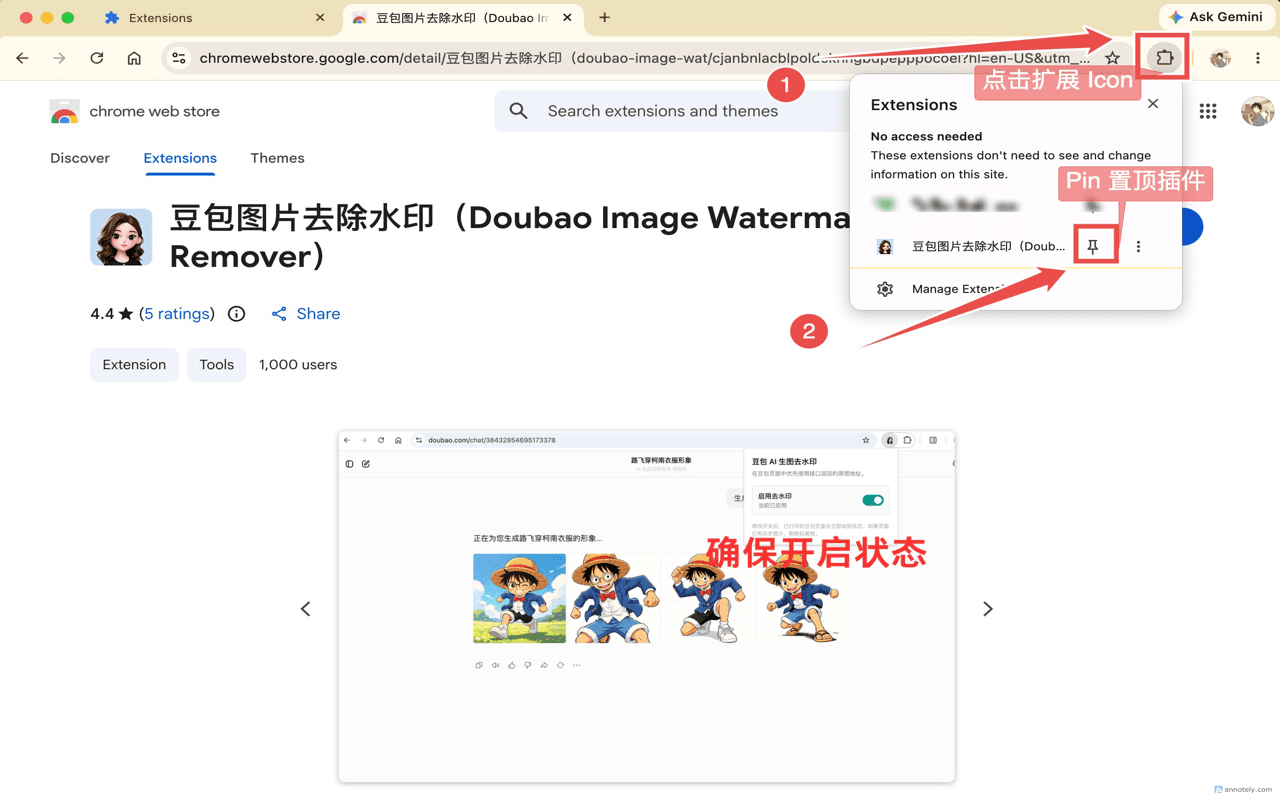
1Pin the extension to toolbar

Click the puzzle icon in Chrome toolbar, find Doubao Watermark Remover, and click the pin icon to fix it to your toolbar

Step 1 - Pin extension to toolbar
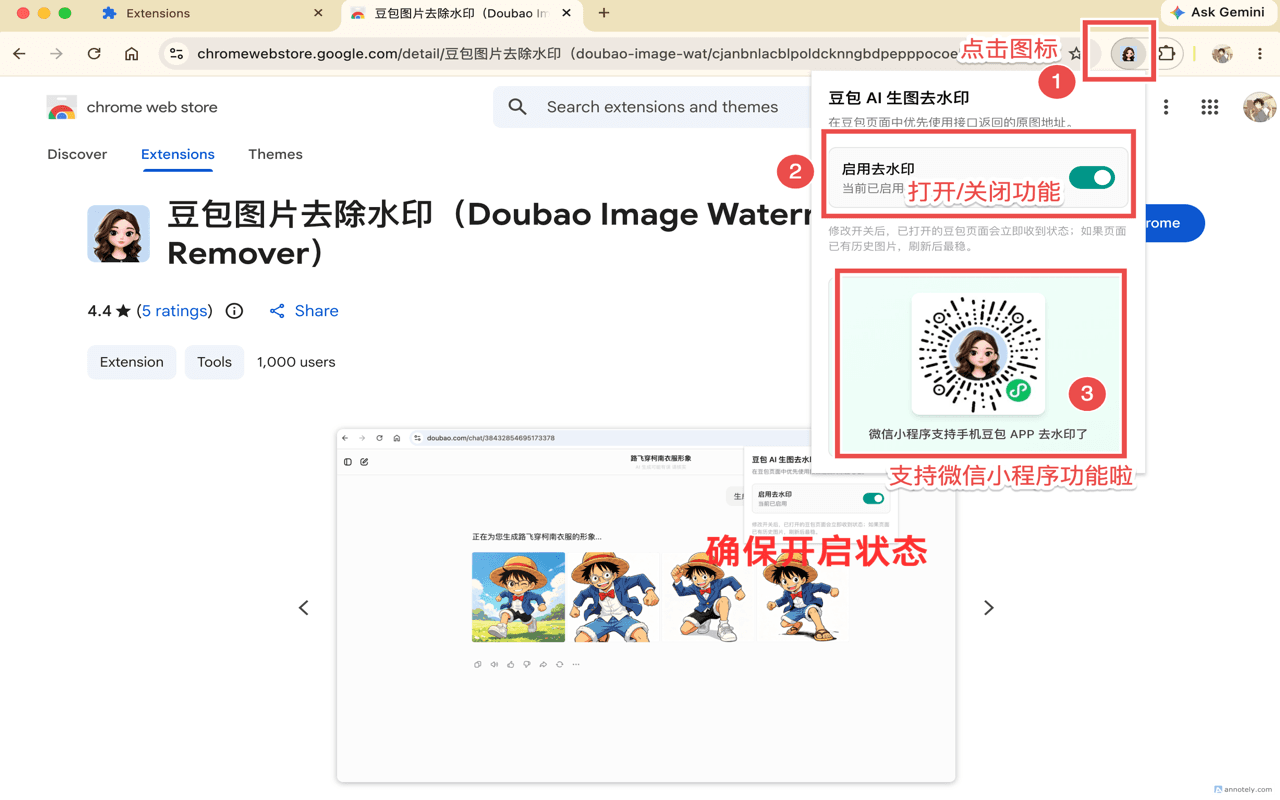
2Enable the watermark remover

Click the Doubao Watermark Remover extension icon in toolbar to enable the feature. It works automatically on Doubao pages

Step 2 - Enable extension feature
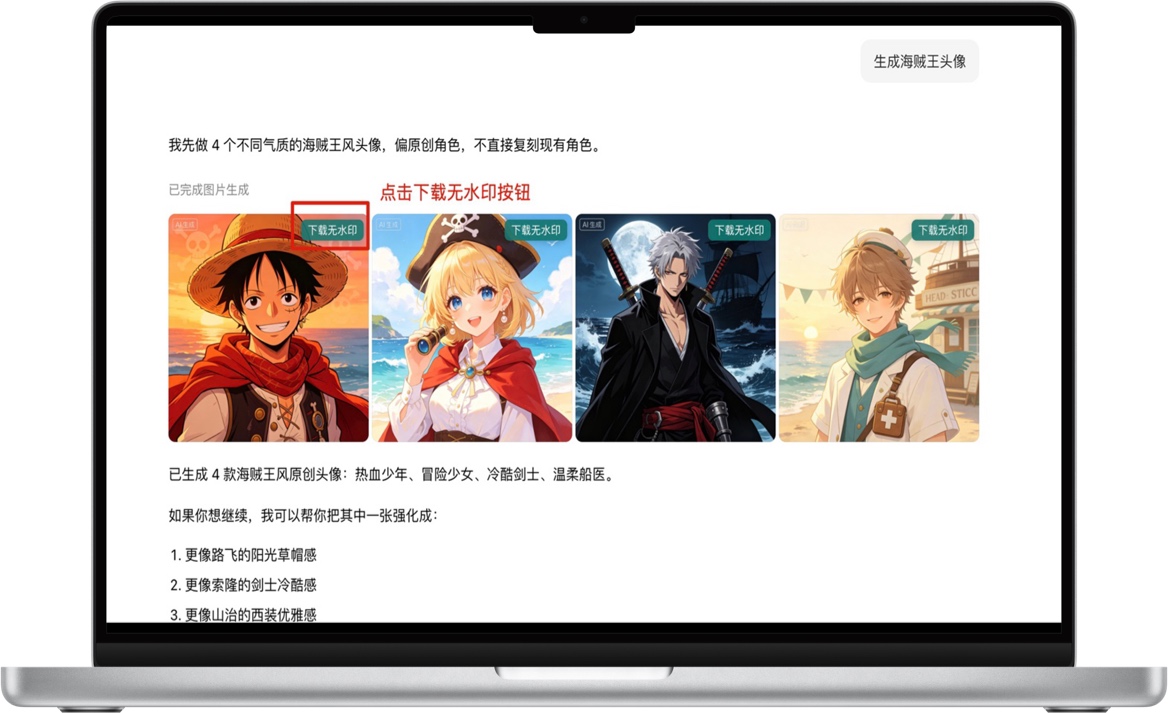
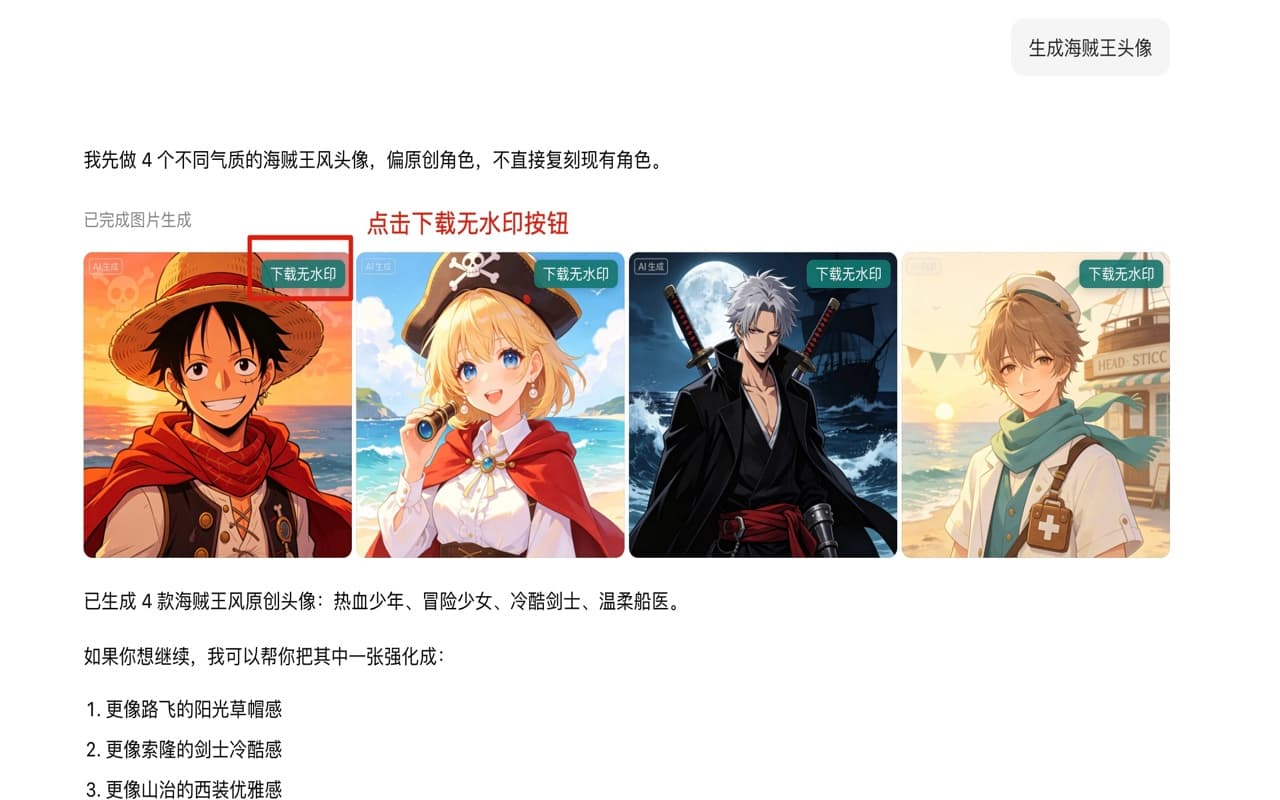
3Get watermark-free HD images

No action needed. Watermarks are automatically removed when Doubao generates images. Save directly as watermark-free HD originals

Step 3 - Watermark-free HD result

About Doubao Watermark Remover

Doubao Watermark Remover is a free online tool for removing watermarks from Doubao AI-generated images. We offer both a Chrome extension and WeChat Mini Program, making it easy for users to download original watermark-free images. Designers, content creators, and casual users can all benefit from our tool to quickly get high-quality images without watermarks.

Key Features

  • One-click watermark removal for Doubao images
  • Download high-resolution watermark-free originals
  • Pure local processing, no server uploads
  • Chrome extension and WeChat Mini Program support
  • Completely free, no login required
  • Privacy-protected, secure and reliable

Use Cases

Suitable for various scenarios where you need to use Doubao AI-generated images, including social media posts, blog article illustrations, design materials, creative works, and more. Our tool supports batch processing with simple operation and remarkable results.

Core Features

A watermark removal solutionbuilt for AI creators

Simple, safe, and efficient. Easily save and use your Doubao AI-generated images. Completely free with Chrome extension and WeChat Mini Program support.

One-click watermark-free originals

Click the download button on the Doubao page to automatically get the watermark-free high-resolution original. Simple enough for anyone. Available on both Chrome extension and WeChat Mini Program.

Pure local privacy protection

All processing is done locally in your browser. No image uploads, no account collection, no content saving. Zero privacy leakage. Doubao Watermark Remover strictly protects your data security.

Smart auto-detection

Intelligently identifies AI-generated images on Doubao pages. No complex configuration needed. Ready to use as soon as you open the page. Free with unlimited usage.

Focused on Doubao experience

Optimized specifically for doubao.com. Accurately fetches original image links without affecting normal use of other websites. Supports Chrome, Edge, Brave, and other major browsers.

Mobile Support

WeChat Mini Programis now online

Remove watermarks from Doubao AI images anytime on your phone. Creation is no longer limited to your computer

WeChat Mini Program QR Code

Scan QR code with WeChat to use

Convenient mobile use

Remove watermarks from Doubao images right on your phone. Process your AI-generated images anytime, anywhere — on the subway or at a café.

One-click original download

Copy the image link from the Doubao APP, paste it into the Mini Program to quickly get the watermark-free original. Simple enough to take just a few seconds.

Free to use
No app download required
Instant access
FAQ

Questions you mightwant to ask

If you have other questions, feel free to send us feedback

Is this extension safe? Will my images be uploaded?

Completely safe. All image processing is done locally in your browser and never uploaded to any server. We don't collect account information or save any of your generated images. Your creative privacy is strictly protected. Doubao Watermark Remover commits to pure local processing.

Is the extension free?

Yes, both the Doubao Watermark Remover extension and WeChat Mini Program are completely free. You can install from the Chrome Store or use the Mini Program by scanning the QR code with WeChat. No payment required, no usage limits.

Which browsers are supported?

Currently supports Chromium-based browsers including Google Chrome, Microsoft Edge, Arc, Brave, and more. Any browser that can access the Chrome Store can install the extension. The WeChat Mini Program supports both iOS and Android phones.

Does removing the watermark affect image quality?

No. The extension directly fetches the watermark-free original image link returned by Doubao. You download the original high-quality image at its full resolution — identical quality to when it was generated, with zero quality loss.

How do I use the WeChat Mini Program?

Scan the QR code on the page with WeChat to open the Mini Program. Copy the image link from the Doubao APP, paste it into the input field, and click the fetch button to quickly download the watermark-free original. Simple enough to take just a few seconds.

How do I uninstall or disable the extension?

You can toggle the feature on/off at any time through the extension popup. To completely uninstall, open your browser's extension management page (chrome://extensions), find this extension, and click 'Remove'.

Will the extension affect normal Doubao usage?

No. The extension only fetches the original image link when you actively click the download button. All normal Doubao features like chatting and image generation are completely unaffected.